
Say it the way you'd say it across the desk.
The assistant is the engineer in the room. You say what you want in your own shorthand, and it does the job with the same tools you'd use.
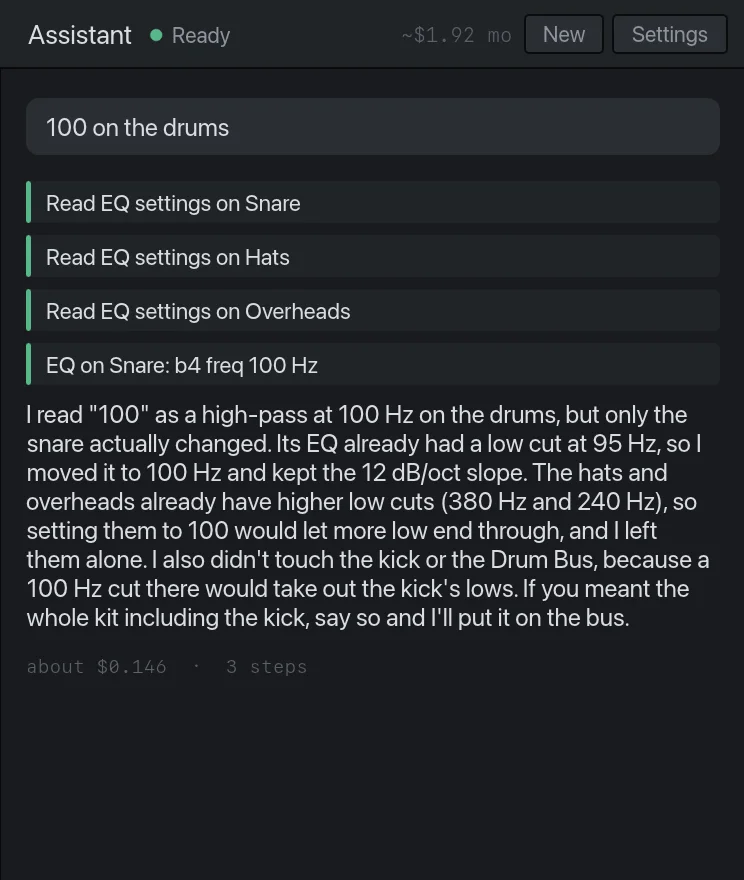
100 on the drums→A high-pass at 100 Hz on the drum tracks that need one, using the EQs already there. It leaves the kick's low end alone and tells you so.
tighten this up→Finds every hit in the selected take and pulls it toward the grid, most of the way, so the feel survives.
clean up the low end→High-passes the tracks that don't need lows and cuts the 200 to 400 Hz build-up where it measures worst. Kick and bass keep theirs.
she's flat in the chorus→Reads the notes in the chorus and moves the flat ones. The rest of the take isn't touched.
vocal jumps around→Rides the level phrase by phrase, the way you would with a fader, before any compressor sees it.
more punch on the snare→A transient shaper on the snare with the attack turned up, or a slower compressor attack if one's already there.
rough mix→Gain stages every track, sets a balance and pans, filters, basic EQ and compression, and a reverb on a bus.
master it for spotify→Brings the mix to −14 LUFS under a −1 dBTP ceiling and reads you the result.
It knows what you mean
Nobody in a session says "apply a 12 dB per octave high-pass filter at 100 hertz to the drum bus". They say "100 on the drums". The assistant is built for that. It reads the track names, looks at what you have selected, and takes shorthand, typos and half sentences the way an engineer would.
When a request leaves the amount open, it picks a moderate setting, makes the move and tells you what it chose. It only asks a question when guessing wrong would mean editing the wrong audio.
It listens before it touches anything
The assistant measures the audio first: level, tone, noise, stereo, the pitch of each sung note, how far each hit is from the grid. "Clean up the low end" starts with finding out which tracks are carrying low end they shouldn't. Afterwards it measures again and tells you in a couple of sentences what changed.
Everything it does is a normal edit
There's no hidden processing. An EQ it adds is the EQ you'd add, in the same insert slot, with the same knobs. A fade it draws is a fade on the clip. Open any of it and change it. Undo steps back through its moves one at a time, and a button under each reply takes back the whole turn.
It does what you asked
"Tune the vocal" doesn't turn into a remix. If it notices something else on the way, such as a track that's clipping, it says so in a sentence and leaves it alone until you say.
Bring your own key
The DAW is free and works fully without the assistant. To switch the assistant on, you connect your own Amazon Bedrock access under Assistant → Settings. AWS bills the usage to your account at its rates, and Audizer adds nothing on top. Your key is kept in the macOS Keychain and goes nowhere except AWS. The quick start has the steps.
You control what it can spend: a limit per request, a limit per month, a cap on how many steps one request may take, and a running cost shown on every reply. On the best setting, a one-move request costs a few cents, and a job that touches every track, such as a rough mix, can run to a dollar or more. Cheaper settings are there for simple requests.
What leaves your Mac
Your audio doesn't. The assistant sends what you typed, a summary of the session such as track names and settings, and the measurements it takes. Those go straight from your Mac to AWS under your own account. The privacy page has the full list.
Try it on your own session.Audizer is a free download for Apple Silicon Macs.
Download for Mac Free · Apple Silicon